
Ghost Driver Driving Controls
Ghost Driver controls
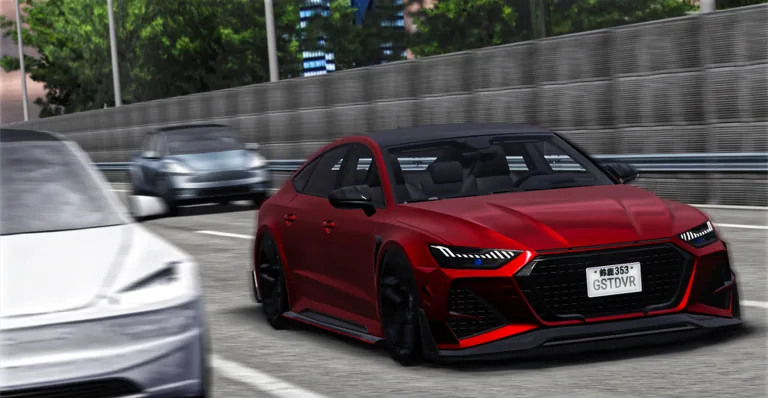
Ghost Driver controls are four official keyboard records from the Roblox experience page. Drive is W / A / S / D or Arrow Keys. Camera / first person is V. Handbrake / drift is Shift. Headlights are L. This lane is the legend for those bindings. It does not add a gamepad map, a sensitivity slider, or a handling formula. The red sedan still is the visual pair for camera and drive context. Night fuel stays reserved for L. Purple tunnel stays reserved for Shift. Capture time for the legend is 2026-08-17T20:15:49.000Z from the official experience page. The same four rows appear on the home briefing board so the legend and the board cannot drift apart.
Confirmed inputs
The official page publishes exactly those four rows. Drive accepts either the WASD cluster or the arrow keys; both strings are first-party. V is listed as Change camera / first person, so the same key covers view changes and the first-person toggle in the published wording. Shift is listed as Handbrake / drift, one row with two verbs. L is Headlights, one verb. Treat each row as an input-to-action pair, not as a complete physics model.
Use this table while you sit in a 15-player public server. If a key does nothing, you are still looking at the official list rather than a missing fifth binding: the captured page simply does not publish extra keys. Continue to Handbrake drift for the Shift boundary and Headlights for the L night plate. Return to Getting started if you have not marked the five pre-lane checks.
WASD and Arrow Keys are both official Drive strings. Do not drop one to shorten the row. V is one letter with two official verbs. Shift is one key with two official verbs. L is one key with one official verb. That is the entire published keyboard surface.
The table on this page is the same four official rows as the home briefing board, presented as a legend you can scan. Drive, camera, handbrake and headlights stay in that order because that is the order the experience page uses.
- Drive
- W / A / S / D or Arrow Keys
- Change camera / first person
- V
- Handbrake / drift
- Shift
- Headlights
- L
Control legend captured from the official experience pageRoblox.
Camera and first person
V is the only published camera key. The official text groups camera change and first person on that one letter. There is no published look-sensitivity number, shoulder-swap key, or cinematic-camera option. Use V to find a view you can read traffic in, then go back to W / A / S / D or Arrow Keys for the drive. The red sedan highway still is the matching official image for this lane because it shows a car in traffic without switching to the reserved night-fuel plate.
If you need the loop language, open Traffic cutting. If you need to practice the rear-end slide input, open Handbrake drift. This page stays the compact legend so the four keys remain scannable in a table instead of being restated as a fake HUD.
First person is not a separate published key. If you cannot find it, you are still on V. There is no published Cinematic or Lock-on row. The red sedan plate on this lane is official experience media, not a user screenshot.
Camera work on this lane is only V. If you came from the red sedan plate, you are in the right image for traffic reading. If you need night lamps, leave this legend and open Headlights instead of looking for a second camera key.
What the legend refuses
No official controller diagram was captured. No official dead-zone, assist toggle, or invert-look setting appears on the experience page. This site therefore does not draw a gamepad or invent bumper names. Players on Xbox, PlayStation or Meta Quest still join the same public experience; they do not get a second invented control sheet here.
The four keys are enough to start the published loop and to unlock reading the seven badges. Anything beyond that waits for a first-party update. Snapshot stats on the home briefing are not control data. Codes are not control data. Keep this lane short, tabular, and bound to the official list.
Xbox, PlayStation and Meta Quest appear on the official platform list. They do not come with a second official key legend in the capture. This page therefore refuses to name bumpers or sticks. Keyboard remains the only first-party map.
The home briefing board repeats these four keys so a player who never opens this lane still sees them. This page exists so the same four keys can be scanned as a table with the official action strings intact.
The refusal to draw a gamepad is specific to this controls lane. Platforms are listed; mappings are not. That gap is why Getting started can still send Xbox and PlayStation players to the same four keyboard records.
Keep the table scannable. A paragraph that restates WASD without adding the official Arrow Keys string would be a worse legend than the four-row board already on this page.
Frequently asked questions
What is the drive key in Ghost Driver?
The official page lists W / A / S / D or Arrow Keys for Drive. Both clusters are first-party. There is no published third drive scheme on that page. This driving-controls answer 1 is written for this route only. The four-key legend is the only official keyboard map in the capture. Read Drive, V, Shift and L as published verbs, then leave this lane if you need loop wording or night-fuel context.
How do I change camera or first person?
Press V. The official wording is Change camera / first person on that single key. No extra camera keys were published with the current experience description. This driving-controls answer 2 is written for this route only.
Where are Shift and L documented?
Shift is Handbrake / drift on this legend and on the Handbrake drift lane. L is Headlights on this legend and on the Headlights lane with the reserved night-fuel plate. This driving-controls answer 3 is written for this route only.